How to Recover MultiSig Assets by Yourself
Last updated: 2026-10-28
Ownbit MultiSig assets are held on chain: in a Bitcoin-style MultiSig address, an EVM MultiSig contract, a TRON account with multi-signature permissions, or a Solana MultiSig program. Moving them takes signatures from enough participants; it does not take Ownbit's servers. If the servers are unavailable, each participant signs with the MultiSig Recovery Tool in the Ownbit app (it works offline). You then put the transaction together on a computer and broadcast it through any public node.
The examples use a 2-of-3 MultiSig with participants A, B and C, where A and B sign. Try the process with a small amount first, and check every address before you broadcast. Never give your mnemonic or wallet password to anyone, including anyone who says they are Ownbit support.
Before you start
App versions
These need Ownbit 5.2.0 or later and are marked Ownbit 5.2.0+ in this guide, so update the app first:
- the SOL tool (Solana MultiSigs);
- Choose MultiSig › in the recovery tools, which fills in the fields from a MultiSig stored on your device;
- the page Multisig Management → Recovery → MultiSig self-recovery of each MultiSig, which lists everything needed to recover it and has an Open MultiSig Recovery Tool button (BTC-type, EVM, TRON and Solana MultiSigs);
- correct signatures on Ethereum mainnet for EVM MultiSigs created with Ownbit 4.67.1 or later (contracts v10 / v11 / v21), see section 2.
What you need
- Enough signers. At least m participants (m is the threshold: 2 in a 2-of-3), each with their own Ownbit MultiSig wallet on their phone and its wallet password. If a phone is lost, first restore that participant's MultiSig wallet from its mnemonic (and its BIP39 passphrase, if it has one). Watch-only wallets can't sign.
- The MultiSig's public details. Its address and network; for BTC-type MultiSigs every participant's pubkey and the threshold; for Solana the MultiSig data account. Write them down while the app still shows them: on the MultiSig details page or, in Ownbit 5.2.0+, on the MultiSig self-recovery page (it only reads data stored on the device and needs no internet).
- A computer with Node.js for building and assembling transactions with the code samples below, and an internet connection for looking up balances and nonces and for broadcasting. The signing itself can stay offline.
- Fees. EVM: any address that holds the network's native coin for gas. TRON: the MultiSig account pays (TRX, or its energy / bandwidth). Solana: each signer's own SOL address.
Opening the MultiSig Recovery Tool
Home menu → Blockchain Tools → MultiSig Recovery Tool → Select a coin (BTC, ETH or TRX; SOL in Ownbit 5.2.0+) → Choose wallet (your MultiSig wallet). Fill in the fields, tap MultiSig Sign and enter the wallet password. The tool shows the Signature; tap it to copy. The tool needs no network connection.
In Ownbit 5.2.0+, Choose MultiSig › at the top of each tool lists the matching MultiSigs stored on this device and fills in the fields. A MultiSig that isn't stored on the device (for example after restoring a wallet while Ownbit's server is down) has to be entered by hand.
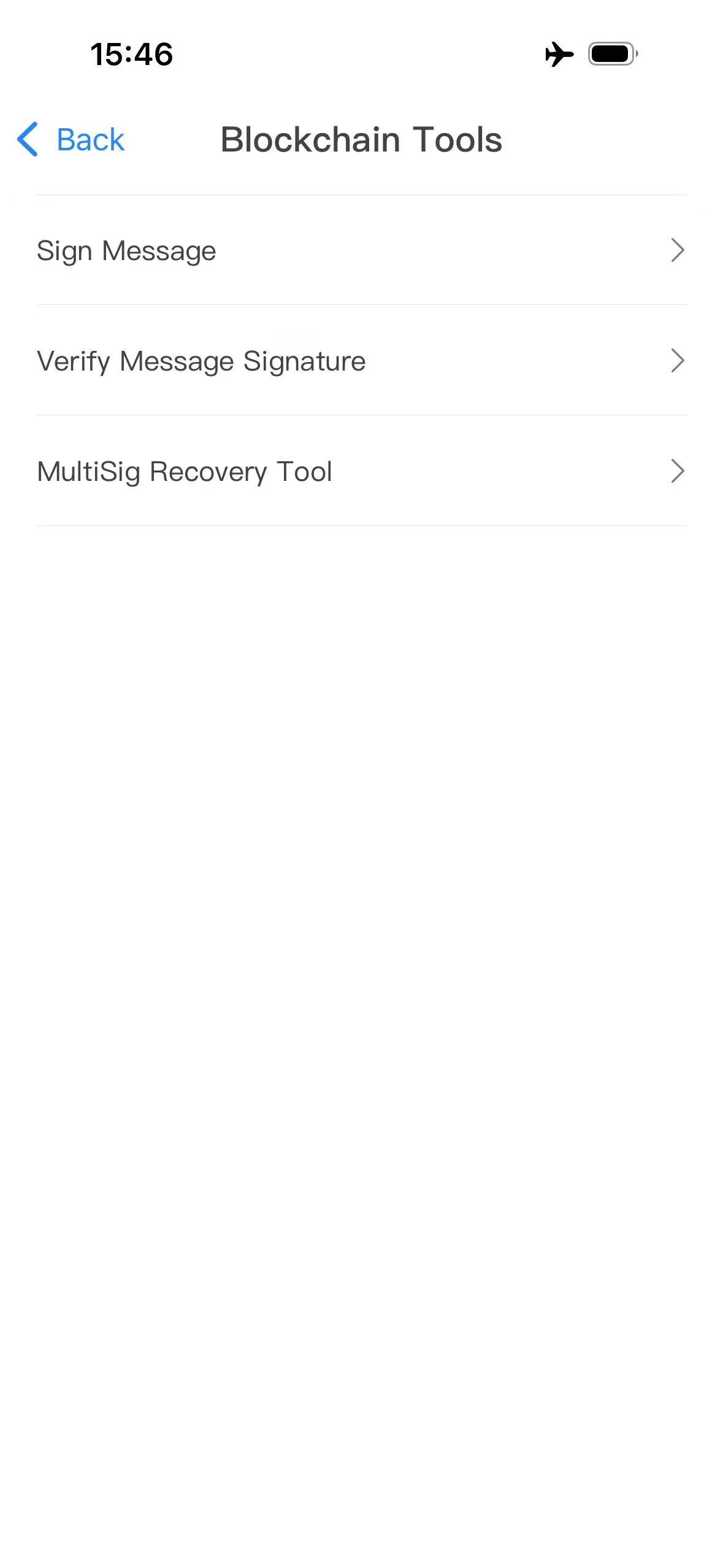
Every signer must enter exactly the same values. Some screenshots are from an earlier version, so the tools may look slightly different in 5.2.0. Field labels are shown in English in every app language.
Which chains, which tool, which app version
| MultiSig | How to recover | Ownbit version | Ownbit needed? |
|---|---|---|---|
| BTC (bc1… and 3… addresses), LTC, DOGE, BCH, DGB | Tool: BTC → assemble → broadcast (section 1) | 5.2.0+ | No. m participants sign. |
| EVM: Ethereum, BNB Smart Chain, Base, HyperEVM, Polygon, Arbitrum One, Optimism | Tool: ETH → call spend() on the contract (section 2) | 5.2.0+ | No. m owners sign (enterprise: Signer weights reach the threshold). Accident protection: after 416 days of inactivity the threshold drops on chain. |
| TRON (TRX, TRC-20) | Tool: TRX → add signatures → broadcast (section 3) | 5.2.0+ | No. m participants sign (enterprise: Signer weights reach the threshold). |
| Solana (SOL, SPL tokens) | Tool: SOL → Create / Approve / Execute (section 4) | 5.2.0+ | No. m participants approve. |
| Accident protection on BTC, TRON, Solana | Same as above; Ownbit Official holds one extra key (section 5) | as above | Only if fewer than m of the original keys are left. Co-signing is at Ownbit's discretion. |
| XRP, Stellar | No tool; standard XRP Ledger / Stellar tools (section 6) | not needed | No. m signers sign. |
| DASH, ZEC, Taproot, EVM contracts v4 / v5 | Not covered (section 7) | — | — |
"Ownbit needed?" refers to Ownbit's servers and to Ownbit Official as a co-signer. You always need the participants' own keys.
1. BTC and other UTXO coins (LTC, DOGE, BCH, DGB)
An Ownbit BTC-type MultiSig is a standard m-of-n script, OP_m <pubkeys, sorted> OP_n OP_CHECKMULTISIG, with no timelock. BTC addresses starting with bc1 are P2WSH; BTC addresses starting with 3 are P2SH. LTC, DOGE, BCH and DGB MultiSigs are P2SH. Each participant's key is at m/44'/0'/0'/0/0 of their MultiSig wallet on all of these chains, so a participant has the same pubkey on BTC, BCH, LTC, DOGE and DGB.
a. Step one: find the UTXOs. Look up the MultiSig address in a block explorer, for example mempool.space for BTC or blockchair.com for LTC, DOGE, BCH and DGB. Every output the address has received and not yet spent is a UTXO. For each one, note the transaction hash, the output index (0 for the first output, 1 for the second, and so on) and the amount in satoshis.
b. Step two: build the Input Output JSON. The inputs are the UTXOs. The outputs are the recipient and, if you don't spend everything, a change address (usually the MultiSig address itself). Amounts are in satoshis; the sum of the inputs minus the sum of the outputs is the miner fee. The input fields depend on the address type:
| Address type | Fields of each input |
|---|---|
| BTC bc1… (P2WSH) | "segwit": "D", "txHash", "index", "satoshis" |
| BTC 3… (P2SH) | "txHash", "index" (no satoshis, no segwit) |
| LTC, DOGE, BCH, DGB | "txid", "vout", "satoshis" |
Every output has "address" and "amount" (satoshis). The JSON must be valid: no comments, no trailing commas.
Example for a bc1 MultiSig (the first output is the recipient, the second is change; the fee is 469,800 − 468,144 = 1,656 satoshis):
        {
          "inputs": [{
            "segwit": "D",
            "txHash": "757ef70941ea9170cc918097630a7aa7e4c644e3f8d73a15ff1e98d321bf5b62",
            "index": 1,
            "satoshis": 13400
          }, {
            "segwit": "D",
            "txHash": "637dfeda367f051d34228badfef09726f0893653fe8baebbe6e150ea68e756f3",
            "index": 2,
            "satoshis": 456400
          }],
          "outputs": [{
            "address": "bc1q2dzu8fcrr66yq9n8q5u6qhwleslqystahdw923",
            "amount": 10000
          }, {
            "address": "bc1q8dl3vmrqmcs4xpyn884upnedlj2t6uewnfdnp034wqfjghpm5ghqupl9v9",
            "amount": 458144
          }]
        }
Example for a 3… MultiSig:
        {
          "inputs": [{
            "txHash": "<transaction hash of the UTXO>",
            "index": 0
          }],
          "outputs": [{
            "address": "<recipient address>",
            "amount": 50000
          }]
        }
Example for LTC (DOGE, BCH and DGB use the same fields):
        {
          "inputs": [{
            "txid": "b830d41437f2f1cb3c5303c6626cc9762979bf88bd9bcfbb5a356150e86ef0ad",
            "vout": 1,
            "satoshis": 94960
          }],
          "outputs": [{
            "address": "LeDXT3evSeAQyCwa2b4ohjS9YxcV9dx7AC",
            "amount": 10000
          }, {
            "address": "MHosP5QAgWrqLGrEvYDRQVDxDohSoUsZA4",
            "amount": 79920
          }]
        }
c. Step three: prepare the Pubkeys. The MultiSig details page shows each participant's pubkey (in Ownbit 5.2.0+ also the MultiSig self-recovery page, and Choose MultiSig › fills them in):
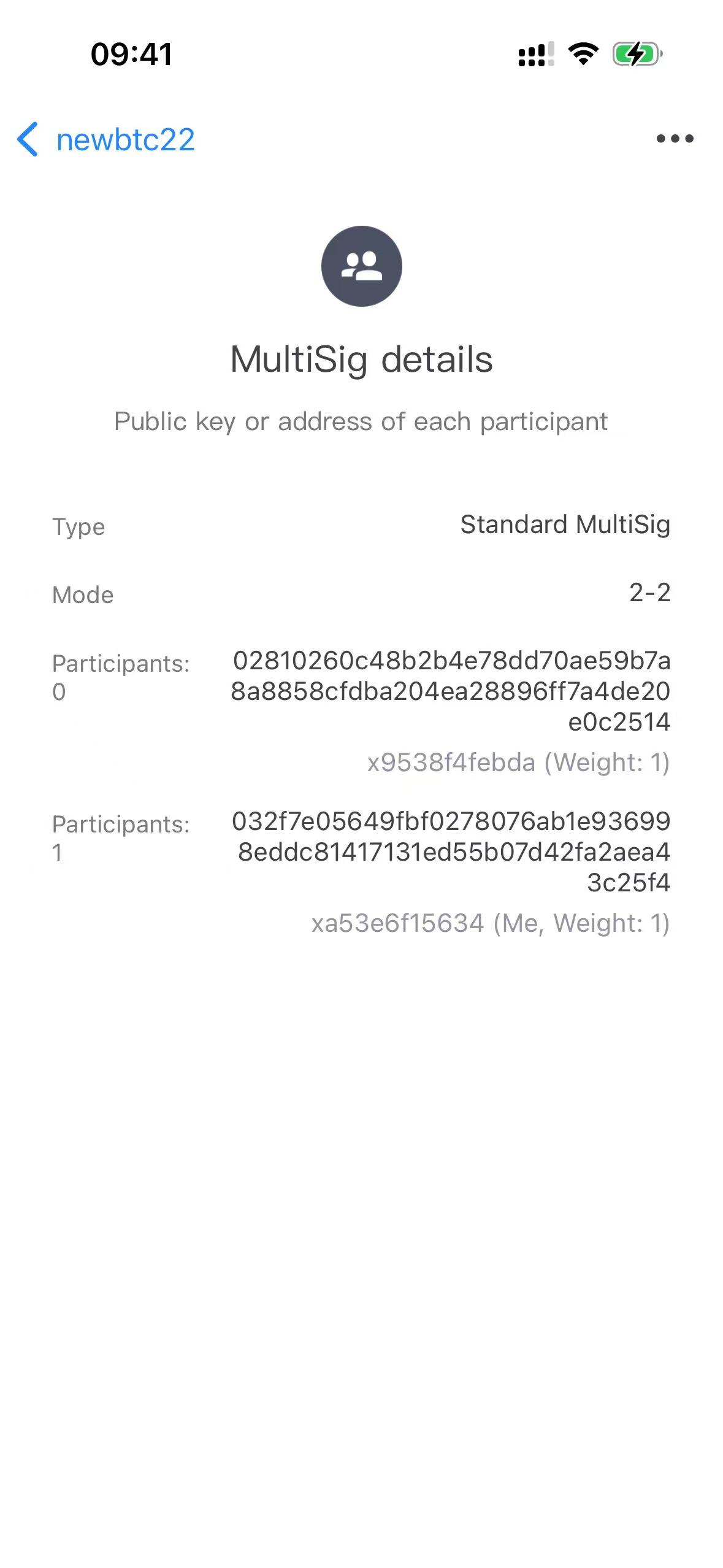
Enter all n pubkeys of the MultiSig, including Ownbit Official's if the MultiSig has accident protection, separated by colons (:). The order doesn't matter; the tool sorts them. Each pubkey is a compressed key of 66 hex characters starting with 02 or 03; the tool accepts 2 to 9 of them. Example:
02810260c48b2b4e78dd70ae59b7a8a8858cfdba204ea28896ff7a4de20e0c2514:032f7e05649fbf0278076ab1e936998eddc81417131ed55b07d42fa2aea43c25f4:<C's pubkey>
A pubkey can also be derived from the participant's MultiSig wallet mnemonic:
        Mnemonic (+ BIP39 passphrase, if any)
            ↓
        Seed (BIP39)
            ↓
        Master key (BIP32)
            ↓
        Path m/44'/0'/0'/0
            ↓
        Child public key at index 0 (pubkey at m/44'/0'/0'/0/0, compressed)
d. Step four: sign. A and B each open MultiSig Recovery Tool → BTC on their own phone and fill in:
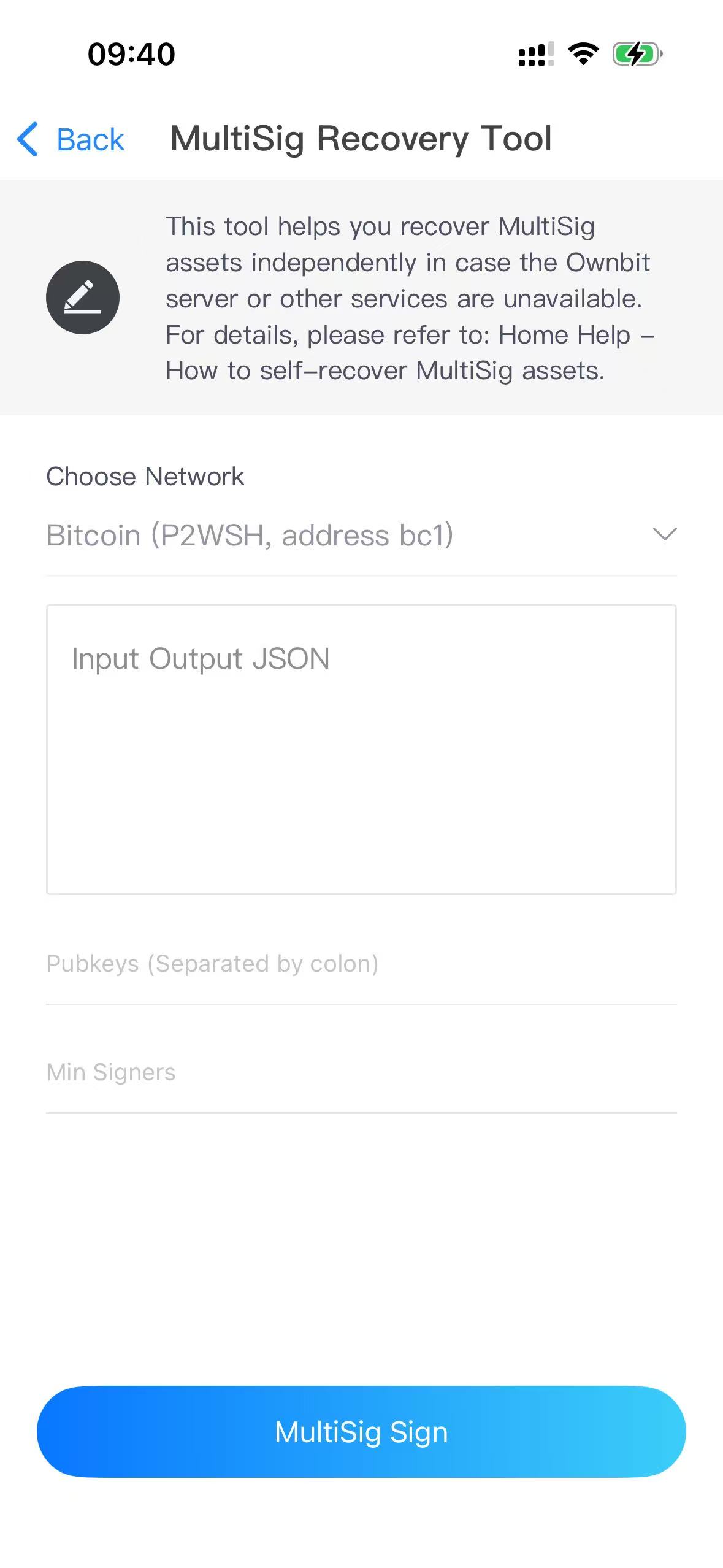
| Field | What to enter |
|---|---|
| Choose Network | Bitcoin (P2WSH, address bc1), Bitcoin (P2SH, address 3), Bitcoin Cash, Litecoin, Dogecoin or DigiByte |
| Input Output JSON | The JSON from step two |
| Pubkeys (Separated by colon) | All pubkeys from step three |
| Min Signers | The threshold m, e.g. 2 for a 2-of-3 |
Tap MultiSig Sign. The tool refuses to sign if your own pubkey isn't in Pubkeys. The result has one signature per input, in input order: sig1:<hex> for input 0, sig2:<hex> for input 1, and so on.
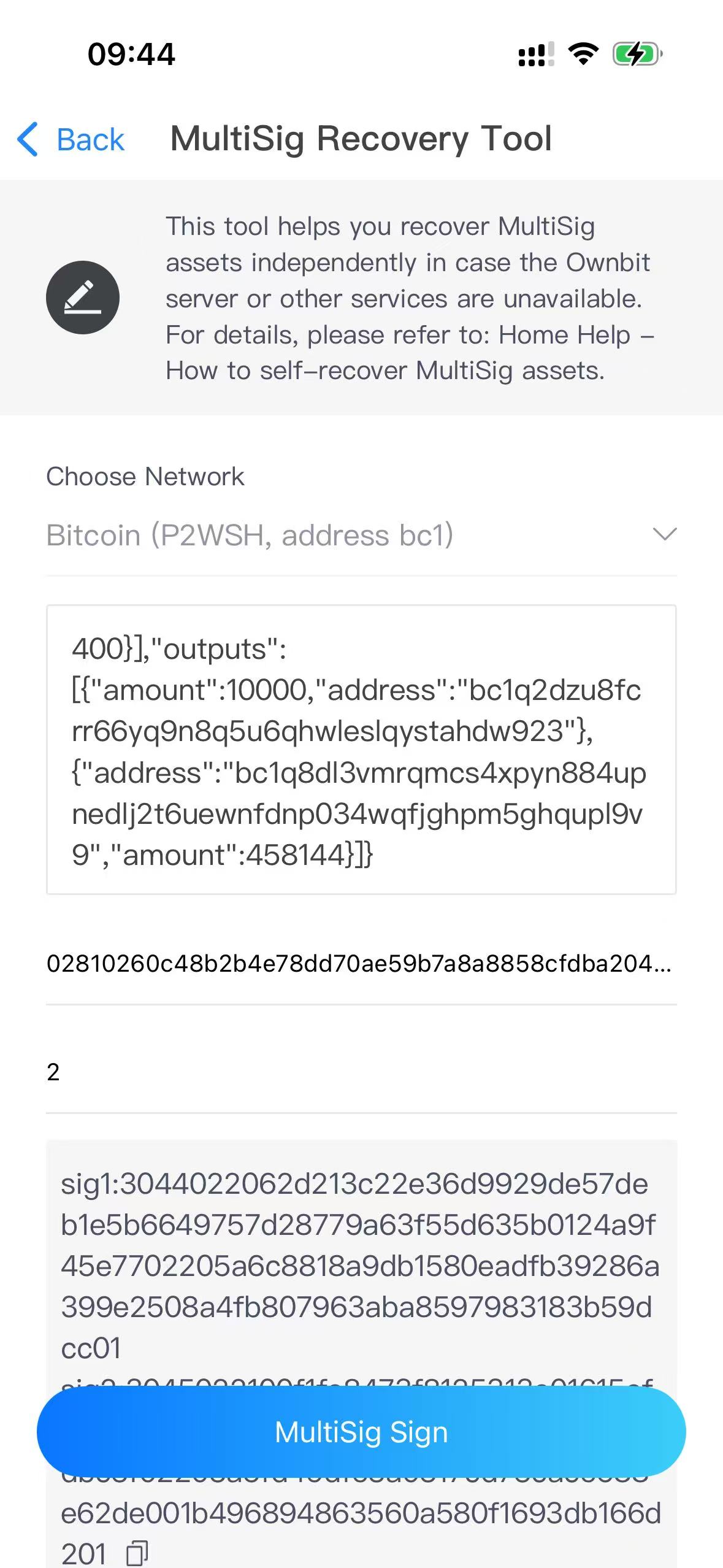
e. Step five: assemble the transaction. Two rules:
- Each input gets exactly m signatures, in the order of the sorted pubkeys (the order of the keys in the script), not in the order you collected them.
- Rebuild the transaction exactly as the tool signed it: inputs and outputs in the order of your JSON, version 2, locktime 0, sequence 0xffffffff. Any difference makes the signatures invalid.
Example for a bc1 (P2WSH) MultiSig with bitcoinjs-lib v6. It also prints the MultiSig address computed from the pubkeys and Min Signers; it must equal your MultiSig address.
        const bitcoin = require('bitcoinjs-lib'); // v6

        const M = 2; // Min Signers

        // All n pubkeys of the MultiSig (as entered in "Pubkeys"), sorted the way the tool sorts them
        const PUBKEYS = [
          '02810260c48b2b4e78dd70ae59b7a8a8858cfdba204ea28896ff7a4de20e0c2514', // A
          '032f7e05649fbf0278076ab1e936998eddc81417131ed55b07d42fa2aea43c25f4', // B
          // the sample data is from a 2-of-2 MultiSig; in a 2-of-3, add C's pubkey here
        ].map(k => k.toLowerCase()).sort();

        // Signatures from the tool, by signer pubkey: [sig1 (input 0), sig2 (input 1), ...]
        const SIGS = {
          '02810260c48b2b4e78dd70ae59b7a8a8858cfdba204ea28896ff7a4de20e0c2514': [
            '3044022041fa6e561e5906e03148b540d47f9bcf77d9b3505fcc15b0b0c51843cb359052022069ffd710386f5f2c968ce5e39715b8a0f3a9667f7486ab6cec08a2afd2bc874901',
            '3045022100ee8dea3f7a8c1333c4a0e8a2e59206cb495bd7ecbbfec7122dea32cb90a7f9210220117a280d11d45c71b90047b5a430e2ec0ab18fe24064c911ac61926fee0eb53601'
          ],
          '032f7e05649fbf0278076ab1e936998eddc81417131ed55b07d42fa2aea43c25f4': [
            '3044022062d213c22e36d9929de57deb1e5b6649757d28779a63f55d635b0124a9f45e7702205a6c8818a9db1580eadfb39286a399e2508a4fb807963aba8597983183b59dcc01',
            '3045022100f1fe8473f8125313e01615ef0db9b6b76dc5328ad2ace90905ce77948a2dbc3f02203a5fd49dfe3a0317cd73cace688e62de001b496894863560a580f1693db166d201'
          ]
        };

        // Same inputs and outputs, in the same order, as the Input Output JSON
        const INPUTS = [
          { txHash: '757ef70941ea9170cc918097630a7aa7e4c644e3f8d73a15ff1e98d321bf5b62', index: 1 },
          { txHash: '637dfeda367f051d34228badfef09726f0893653fe8baebbe6e150ea68e756f3', index: 2 }
        ];
        const OUTPUTS = [
          { address: 'bc1q2dzu8fcrr66yq9n8q5u6qhwleslqystahdw923', amount: 10000 },
          { address: 'bc1q8dl3vmrqmcs4xpyn884upnedlj2t6uewnfdnp034wqfjghpm5ghqupl9v9', amount: 458144 }
        ];

        const redeem = bitcoin.payments.p2ms({ m: M, pubkeys: PUBKEYS.map(k => Buffer.from(k, 'hex')) });
        const p2wsh = bitcoin.payments.p2wsh({ redeem });
        console.log('MultiSig address:', p2wsh.address); // must be your bc1 MultiSig address

        const tx = new bitcoin.Transaction();
        tx.version = 2;  // the tool signs version-2 transactions (bitcoinjs-lib defaults to 1)
        tx.locktime = 0;
        INPUTS.forEach(i => tx.addInput(Buffer.from(i.txHash, 'hex').reverse(), i.index, 0xffffffff));
        OUTPUTS.forEach(o => tx.addOutput(bitcoin.address.toOutputScript(o.address, bitcoin.networks.bitcoin), o.amount));

        // The first M signers in sorted-pubkey order
        const signers = PUBKEYS.filter(k => SIGS[k]).slice(0, M);
        if (signers.length < M) throw new Error('Not enough signatures');

        // Witness of each input: empty item, M signatures in sorted-pubkey order, the script
        INPUTS.forEach((_, n) => {
          tx.setWitness(n, [Buffer.alloc(0), ...signers.map(k => Buffer.from(SIGS[k][n], 'hex')), redeem.output]);
        });

        console.log(tx.toHex()); // finalHex
For a 3… (P2SH) MultiSig, build the address with bitcoin.payments.p2sh({ redeem }) (it must equal your 3… address) and put the signatures in the input script instead of the witness:
        INPUTS.forEach((_, n) => {
          tx.setInputScript(n, bitcoin.script.compile([
            bitcoin.opcodes.OP_0,
            ...signers.map(k => Buffer.from(SIGS[k][n], 'hex')),
            redeem.output
          ]));
        });
BTC signatures from the tool already end with the sighash-type byte (01). For LTC, DOGE, BCH and DGB the tool signs with the bitcore libraries (bitcore-lib-ltc and the equivalents for the other coins); their signatures are DER without the sighash-type byte. Assemble those transactions with the same library: add each input with tx.from({ txId, outputIndex, satoshis, script }, pubkeys, m) and each output with tx.to(address, amount) in the same order as your JSON, then add the m signatures with tx.applySignature(...) (sighash type SIGHASH_ALL; for BCH SIGHASH_ALL | SIGHASH_FORKID).
f. Step six: broadcast the finalHex. For BTC, for example:
        curl -X POST https://mempool.space/api/tx \
          -H "Content-Type: text/plain" \
          -d '<finalHex>'
For LTC, DOGE, BCH and DGB, use a node of that coin or a block explorer's broadcast page.
2. EVM MultiSigs (native coin, ERC-20 and NFTs)
An Ownbit EVM MultiSig is a smart contract. Assets move when someone calls its spend() function with enough owner signatures. In the MultiSig Recovery Tool (coin ETH) each participant makes one signature (r, s, v); you then encode the spend() call and send it to the contract from any address that has gas. Each participant's signing key is at m/44'/60'/0'/0/0 of their MultiSig wallet.
Choose Network in the tool offers Ethereum (chain ID 1), BNB Smart Chain (56), Base (8453), HyperEVM (999), Polygon (137), Arbitrum One (42161) and Optimism (10). New MultiSigs can currently be created on Ethereum, BNB Smart Chain, Base, Arbitrum, HyperEVM and Polygon; Optimism stays in the list for existing MultiSigs. Choose the network the MultiSig is on: the chain ID is part of the signed message.
Contract generations
| Generation | Contracts | Chain ID in the signed message |
|---|---|---|
| New (created with Ownbit 4.67.1 or later) | v10 standard, v11 accident protection, v21 enterprise | On every network, including Ethereum mainnet |
| Old | v6 standard, v8 accident protection, v20 enterprise | Only on networks other than Ethereum mainnet |
Signatures made for one generation don't work for the other. Legacy contracts v4 / v5 (Ownbit 4.37.1 and earlier) are not supported by the tool, see section 7.
To tell which generation a MultiSig is:
- In Ownbit 5.2.0+, the MultiSig self-recovery page shows its Contract version, and the tool picks the right signing method by itself when the MultiSig is stored on the device. Otherwise it asks for the Contract version: New contract (v10 / v11 / v21) or Old contract (v6 / v8 / v20). A wrong choice makes the signature invalid.
- On chain: only v10 / v11 / v21 have
getWalletConnectVersion()(selector0xb7869bac). If this call returns a value, it's a new contract; if it reverts or returns nothing, it's an old one.
        curl -X POST <RPC URL of the network> \
          -H "Content-Type: application/json" \
          -d '{"jsonrpc":"2.0","id":1,"method":"eth_call","params":[{"to":"<MultiSig address>","data":"0xb7869bac"},"latest"]}'
a. Step one: get the Spend Nonce. It is the number of spend() calls the contract has executed with valid signatures. A spend() call that reverted doesn't count; a spend() whose signatures were valid counts even if the transfer inside it failed. It is not the number of transactions you can see "from" the MultiSig address. Read it from the contract with getSpendNonce() (selector 0xc6a2a9f1, on all of v6 / v8 / v10 / v11 / v21; new contracts also have spendNonce(), 0x843b1a09):
        curl -X POST <RPC URL of the network> \
          -H "Content-Type: application/json" \
          -d '{"jsonrpc":"2.0","id":1,"method":"eth_call","params":[{"to":"0xD0BF699Fb29810bB58b5F6EDb482227b529Dfc5a","data":"0xc6a2a9f1"},"latest"]}'

        {"jsonrpc":"2.0","id":1,"result":"0x0000000000000000000000000000000000000000000000000000000000000016"}
The result is hexadecimal: 0x16 = 22, so the Spend Nonce is 22. Enterprise MultiSigs also have a separate config nonce for owner / signer changes; for spending, use the spend nonce.
b. Step two: sign. A opens MultiSig Recovery Tool → ETH and fills in the fields for the asset you want to move:
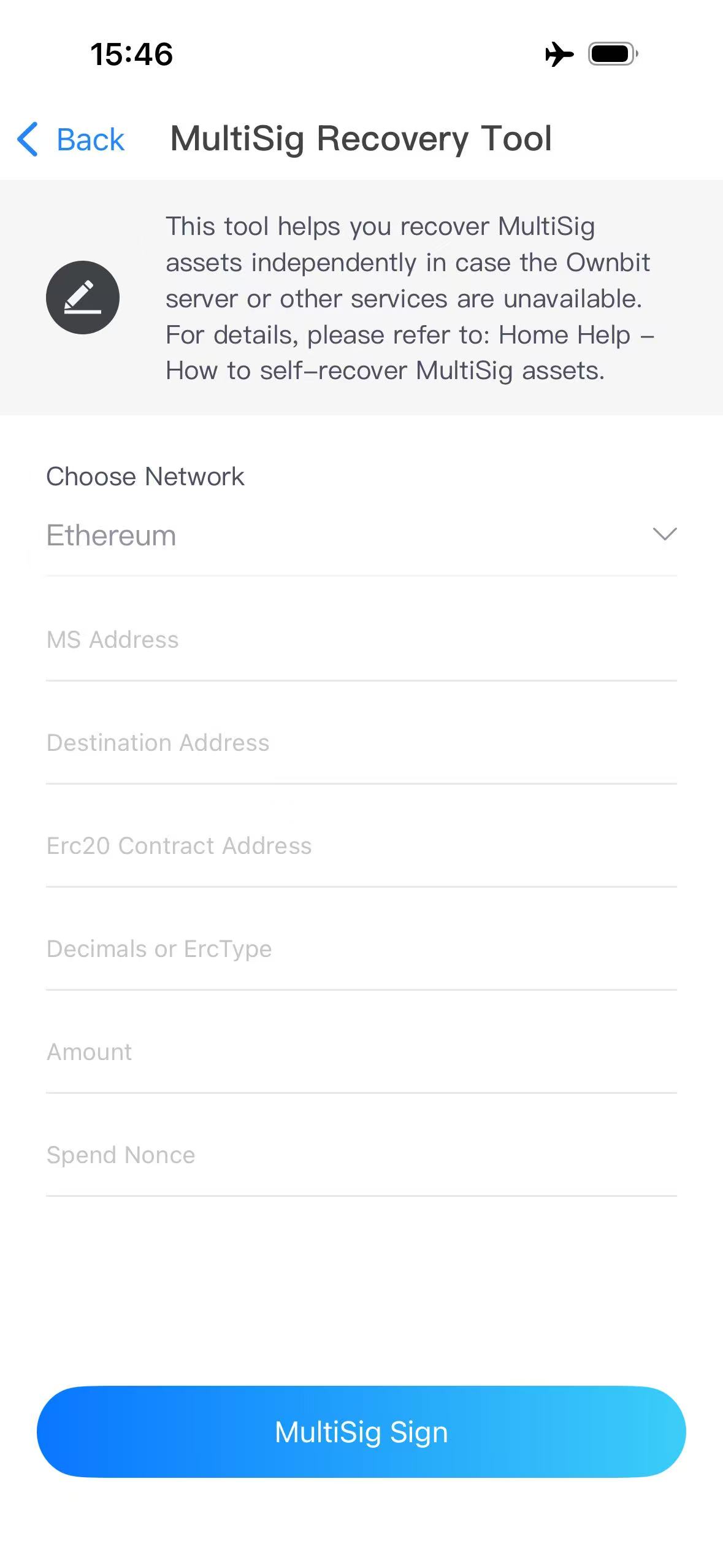
| Field | Native coin (ETH, BNB, POL…) | ERC-20 token | NFT (ERC-721 / ERC-1155) |
|---|---|---|---|
| Choose Network | The network the MultiSig is on | ||
| MS Address | The MultiSig contract address | ||
| Destination Address | The recipient's address | ||
| Erc20 Contract Address (0x0 = ETH) | 0x0 (stands for the network's native coin) |
The token contract, e.g. USDT on Ethereum: 0xdac17f958d2ee523a2206206994597c13d831ec7 | contractAddress_tokenId, e.g. 0xfcad2…009f7b_0x0000…00b9e |
| Decimals or ErcType | 18 |
The token's decimals (0–18; USDT: 6) | 1 = ERC-721, 2 = ERC-1155 |
| Amount | e.g. 1.2 | e.g. 2000 | Number of NFTs, e.g. 1 |
| Spend Nonce | From step one | ||
In versions before 5.2.0 the third field is labelled "Erc20 Contract Address". In Ownbit 5.2.0+, Choose MultiSig › fills in the network, MS Address, contract and decimals.
Tap MultiSig Sign. The Signature looks like r:0x…,s:0x…,v:0 (v is 0 or 1).
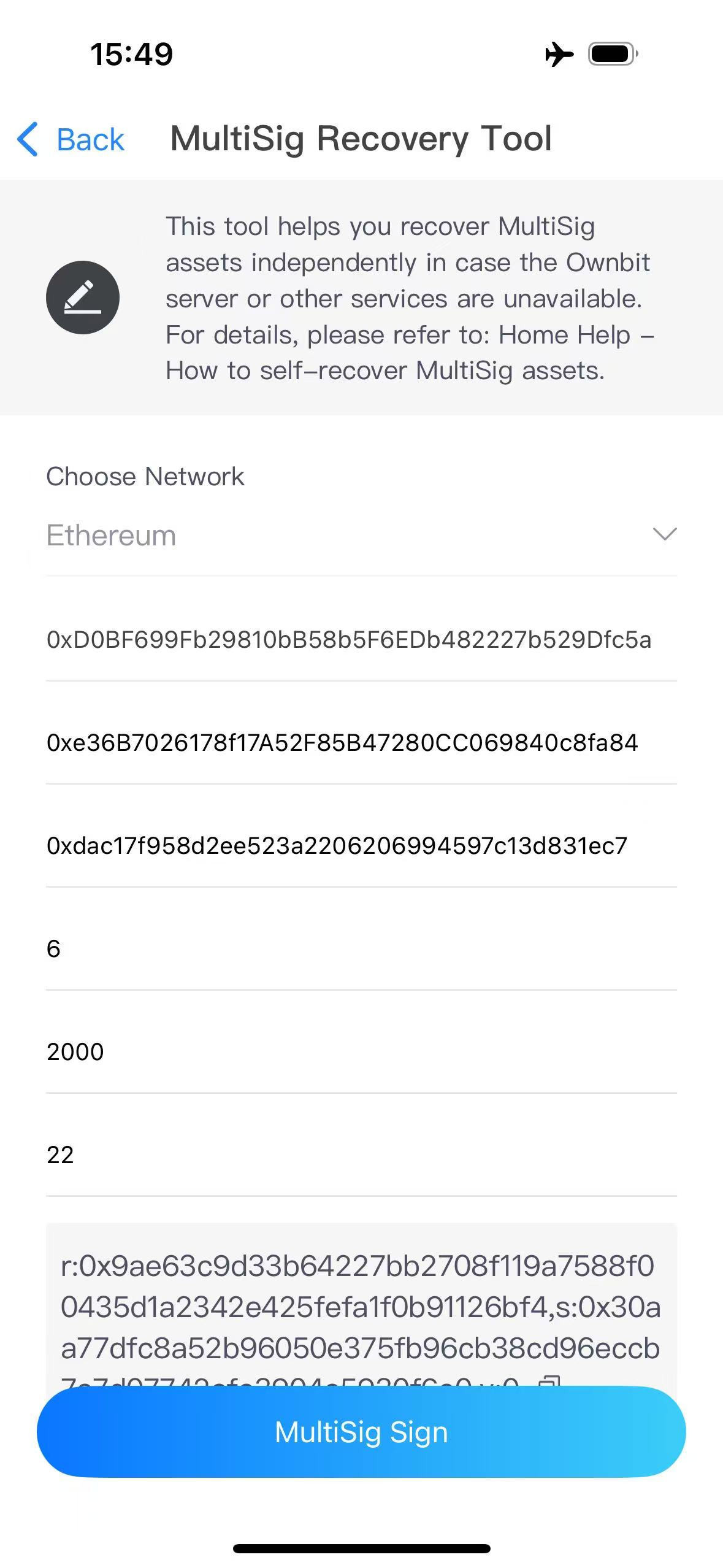
c. Step three: B repeats step two on their own phone. B must enter exactly the same values as A, including the Spend Nonce. You now have two signatures (r, s, v).
Enterprise MultiSig (v20 / v21): only Signers can spend. Collect signatures from Signers until their weights add up to the threshold. Owners (up to 7) only manage owners and signers; an Owner who isn't a Signer can't make a valid spend signature. A v21 contract has up to 9 Signers; read them on chain with getSigners() (0x94cf795e), getSignerWeights() (0x9f27a602) and getSignRequired() (0x3fd3407e). The whitelist, limits and Security Admins are enforced by Ownbit's server and app, not by the contract, so they don't apply to self-recovery: check the recipient address carefully.
d. Step four: build the spend() calldata. The contract's function is:
function spend(address destination, uint256 value, uint8[] vs, bytes32[] rs, bytes32[] ss, bytes data)
// selector 0x7c99df4a
The values must match exactly what the tool signed:
| Asset | destination | value | data |
|---|---|---|---|
| Native coin | Recipient | Amount in wei | 0x (empty, not 0x0) |
| ERC-20 | Token contract | 0 | transfer(recipient, amount in the token's smallest unit), starts with 0xa9059cbb |
| ERC-721 | NFT contract | 0 | safeTransferFrom(MultiSig address, recipient, tokenId), starts with 0x42842e0e |
| ERC-1155 | NFT contract | 0 | safeTransferFrom(MultiSig address, recipient, tokenId, amount, 0x), starts with 0xf242432a |
vs, rs and ss are arrays with one entry per signer; keep each signer's r, s and v at the same position. Pass v exactly as the tool printed it (0 or 1); the contract adds 27 itself.
Example with web3.js (sending 2000 USDT on Ethereum):
        const Web3 = require('web3');   // web3.js 1.x; for 4.x use: const { Web3 } = require('web3');
        const web3 = new Web3();

        const spendAbi = {
          name: 'spend', type: 'function',
          inputs: [
            { name: 'destination', type: 'address' },
            { name: 'value', type: 'uint256' },
            { name: 'vs', type: 'uint8[]' },
            { name: 'rs', type: 'bytes32[]' },
            { name: 'ss', type: 'bytes32[]' },
            { name: 'data', type: 'bytes' }
          ]
        };

        // ERC-20: data = transfer(recipient, 2000 USDT = 2000 * 10^6)
        const tokenData = web3.eth.abi.encodeFunctionCall(
          { name: 'transfer', type: 'function',
            inputs: [{ name: 'to', type: 'address' }, { name: 'amount', type: 'uint256' }] },
          ['0xe36b7026178f17a52f85b47280cc069840c8fa84', '2000000000']
        );
        // = 0xa9059cbb000000000000000000000000e36b7026178f17a52f85b47280cc069840c8fa840000000000000000000000000000000000000000000000000000000077359400

        const calldata = web3.eth.abi.encodeFunctionCall(spendAbi, [
          '0xdac17f958d2ee523a2206206994597c13d831ec7',   // destination: the USDT contract
          '0',                                            // value: 0 for tokens
          ['1', '1'],                                     // vs (A, B), as printed by the tool
          ['0xaca5025bd6d2fcd3308aa3589ea7aa419ef67914275ce7be80558584232554f9',
           '0x9028a9e0fee249f874d747c0c082b1b9cdde12505cea47a2e8cc19b567c3fea8'],   // rs
          ['0x3a12af0ee1354b709b5312db6976150fc7ebc74f6f94404005593290c6322e26',
           '0x310e7534a5a0a7e71566c14462c10cf2022c966a390d0edd144895c0c032d599'],   // ss
          tokenData                                       // data
        ]);
        console.log(calldata);

        // Native coin instead: destination = recipient, value = amount in wei, data = '0x', e.g.
        // web3.eth.abi.encodeFunctionCall(spendAbi, ['<recipient>', web3.utils.toWei('1.2', 'ether'), vs, rs, ss, '0x'])
e. Step five: send the calldata. Send a transaction to the MultiSig contract address, value 0, with the calldata as its data (hex data), from any address that holds the network's native coin for gas. The sender doesn't have to be a participant. Estimate the gas first (eth_estimateGas); if the estimate fails, the transaction would revert: check the network, Spend Nonce, contract generation, signers and that every value matches what was signed.
Accident protection (v8 / v11)
The contract itself enforces a 416-day inactivity rule (MAX_INACTIVE_TIME). An owner counts as active for 416 days after their last valid spend signature or active() call (or after the MultiSig was created). While at least m owners are active, the normal threshold applies. When fewer than m are active, the contract only requires the number of active owners (at least 1). So once a participant has been inactive for 416 days, the remaining active owners can spend without Ownbit. Signing works exactly as for a standard MultiSig.
Signing a spend makes each signer active again, and the contract checks the requirement again afterwards. If that raises the requirement above the number of signatures you sent, spend() reverts with "please call active() before calling spend". In that case, the signers who had been inactive first call active() (selector 0x02fb0c5e) on the MultiSig contract from their own owner address (m/44'/60'/0'/0/0, needs gas), and you then send spend() with enough signatures for the new requirement.
Signing without the app (advanced)
The tool signs this message: keccak256(MultiSig address ‖ destination ‖ value (uint256) ‖ data ‖ spendNonce (uint256) ‖ chainId (uint256)), packed (abi.encodePacked) and signed with the Ethereum signed-message prefix ("\x19Ethereum Signed Message:\n32"). The chainId at the end is left out only for old contracts (v6 / v8 / v20) on Ethereum mainnet. With ethers.js v6, on an offline computer:
        const { ethers } = require('ethers'); // v6

        const hash = ethers.solidityPackedKeccak256(
          ['address', 'address', 'uint256', 'bytes', 'uint256', 'uint256'],
          [msAddress, destination, value, data, spendNonce, chainId]
          // old contract on Ethereum mainnet: drop the last 'uint256' and chainId
        );
        const wallet = ethers.HDNodeWallet.fromPhrase(mnemonic, passphrase || '', "m/44'/60'/0'/0/0");
        const sig = ethers.Signature.from(await wallet.signMessage(ethers.getBytes(hash)));
        console.log({ r: sig.r, s: sig.s, v: sig.v - 27 }); // v as 0 / 1, like the tool
Typing a mnemonic into a computer exposes it. Only do this on a computer that is offline and that you trust, and only when the app can't be used.
3. TRON MultiSigs (TRX and TRC-20)
A TRON MultiSig is a regular TRON account with multi-signature permissions; there is no contract. Each participant signs with the key at the Ethereum path m/44'/60'/0'/0/0 of their MultiSig wallet (the participant's TRON address is the T-address of that same key), not with m/44'/195'/….
| MultiSig type | Signers are in | Build the transaction with |
|---|---|---|
| Standard, accident protection, weighted | owner permission (Permission_id 0) | No permissionId (it defaults to 0) |
| Enterprise | active permission (Permission_id 2), Signers only | permissionId: 2 |
With the wrong Permission_id the signatures can't go on chain. In an enterprise MultiSig only Signers sign, and their weights must add up to the threshold.
a. Step one: build the unsigned transaction with TronWeb, with the MultiSig address as the sender. TRC-20 example:
        const { TronWeb } = require('tronweb');   // TronWeb 6; for 5.x use: const TronWeb = require('tronweb');
        const tronWeb = new TronWeb({ fullHost: 'https://api.trongrid.io' });

        (async () => {
          const from = 'T...';   // the MultiSig address
          const to = 'T...';     // the recipient
          const contract = 'TR7NHqjeKQxGTCi8q8ZY4pL8otSzgjLj6t';   // USDT TRC-20
          const amount = 2000000000;                               // 2000 USDT (6 decimals)

          const options = { feeLimit: 15000000, callValue: 0 };
          // Enterprise MultiSig only: options.permissionId = 2;

          const res = await tronWeb.transactionBuilder.triggerSmartContract(
            contract, 'transfer(address,uint256)', options,
            [{ type: 'address', value: to }, { type: 'uint256', value: amount }],
            from
          );
          // Give the signers time: extend the expiration by 1 hour (TRON allows at most 24 hours)
          const tx = await tronWeb.transactionBuilder.extendExpiration(res.transaction, 3600);
          console.log(JSON.stringify(tx));
        })();
TRX example:
        // tronWeb as in the example above
        (async () => {
          const from = 'T...';   // the MultiSig address
          const to = 'T...';
          const amount = 2000000;   // 2 TRX, in sun

          let tx = await tronWeb.transactionBuilder.sendTrx(to, amount, from);
          // Enterprise MultiSig: await tronWeb.transactionBuilder.sendTrx(to, amount, from, { permissionId: 2 });
          tx = await tronWeb.transactionBuilder.extendExpiration(tx, 3600);
          console.log(JSON.stringify(tx));
        })();
Use the printed JSON as is: the unsigned transaction with txID, raw_data and raw_data_hex at the top level (for TRC-20 that is res.transaction, not the whole response). Extend the expiration before anyone signs: changing it afterwards changes the txID and invalidates the signatures.
b. Step two: A and B each open MultiSig Recovery Tool → TRX on their own phone, paste the same JSON into Tron TX JSON and tap MultiSig Sign. The Signature is a hex string.
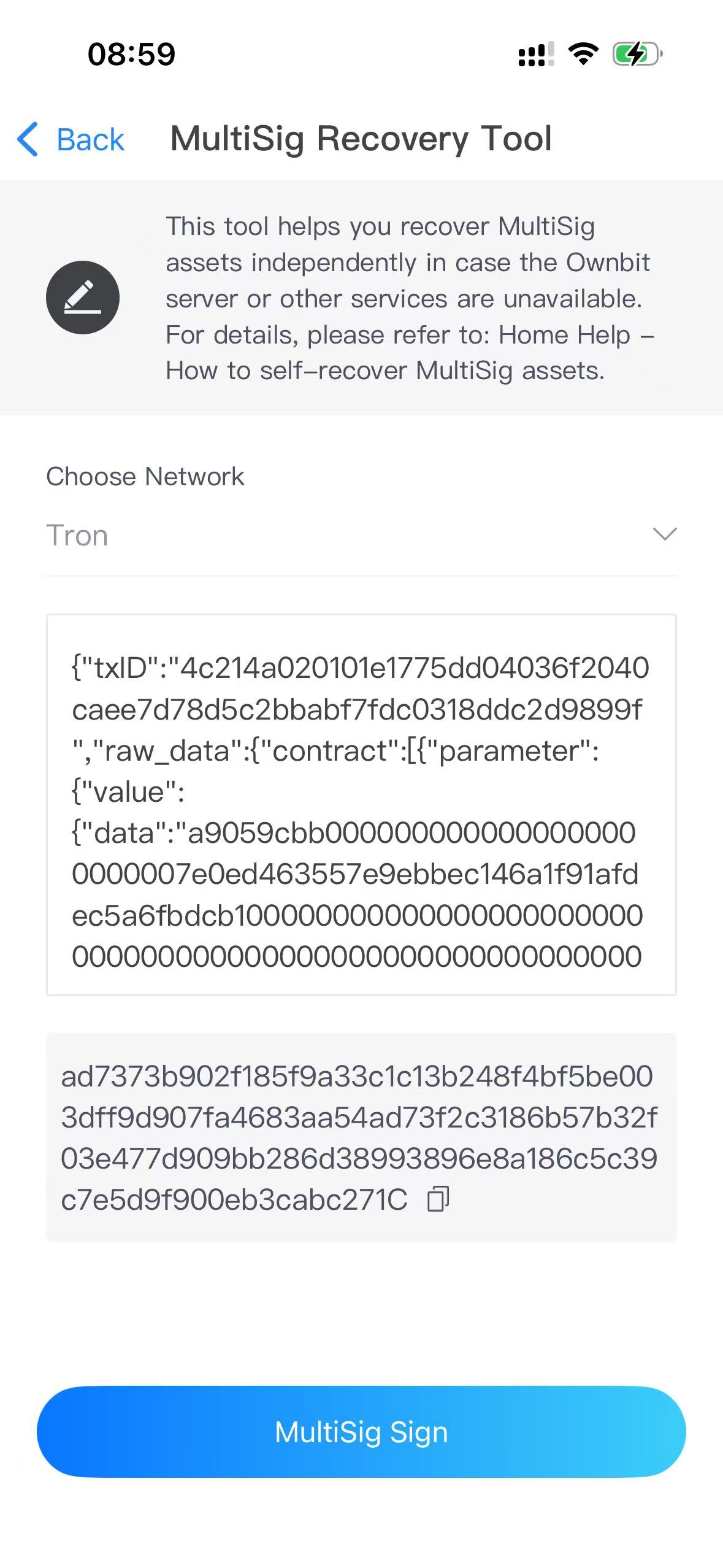
In Ownbit 5.2.0+, after Choose MultiSig › the field shows the Permission_id the MultiSig needs, e.g. "Tron TX JSON (Permission_id = 2)". 5.2.0 also checks that txID = sha256(raw_data_hex), that the transaction has exactly one contract and that its Permission_id fits the MultiSig type, and it refuses to sign for someone who isn't a Signer of an enterprise MultiSig. Earlier versions don't check these, so check the Permission_id yourself.
c. Step three: put all signatures into the signature array of the transaction JSON:
        {
          "txID": "4c214a020101e1775dd04036f2040caee7d78d5c2bbabf7fdc0318ddc2d9899f",
          "raw_data": { "contract": [ ... ], "ref_block_bytes": "...", "expiration": ..., ... },
          "raw_data_hex": "...",
          "visible": false,
          "signature": [
            "ad7373b902f185f9a33c1c13b248f4bf5be003dff9d907fa4683aa54ad73f2c3186b57b32f03e477d909bb286d38993896e8a186c5c39c7e5d9f900eb3cabc271c",
            "cf310bb59e38e7edd00d1e6ab6ac216b3ab80ba6ce2db140456744cce6b7ed610d599330669ca98ddf05e4211d02c54ff0e033cd28f82680ba8d50b9baf03b831b"
          ]
        }
d. Step four: broadcast it before it expires, for example:
        curl -X POST https://api.trongrid.io/wallet/broadcasttransaction \
          -H "Content-Type: application/json" \
          -d '<the signed transaction JSON>'
Or with TronWeb: await tronWeb.trx.sendRawTransaction(signedTx).
4. Solana MultiSigs (SOL and SPL tokens)
Ownbit's Solana MultiSig program is 7uPTVnLrNM9bAdCGrfckz1ugJeRs5bEGcEgcwzPuFsAK (source: github.com/bitbill/ownbit-multisig-contracts). Each MultiSig has a MultiSig data account; the assets sit at the MultiSig address, a PDA derived from it (findProgramAddress([data account], program ID)). Spending takes three instructions:
- create_transaction: an owner creates a proposal; the creator counts as approved;
- approve: other owners approve it;
- execute_transaction: anyone executes it once it has at least the threshold of approvals.
Each participant signs and pays the fee with their own SOL key at m/44'/501'/0'/0' of their MultiSig wallet. Each proposal account keeps about 0.0065 SOL as rent.
With the SOL tool Ownbit 5.2.0+
a. Prepare. Find the MultiSig data account on the MultiSig self-recovery page or on the MultiSig details page (shown after "data:"); Choose MultiSig › fills it in. Every signer's own SOL address needs a little SOL for fees; the 5.2.0 tool shows which address signs and pays.
b. Get a fresh blockhash right before each signature. It expires after about a minute, so sign and broadcast within that time; if it expires, get a new one and sign again.
        curl https://api.mainnet-beta.solana.com -X POST -H "Content-Type: application/json" \
          -d '{"jsonrpc":"2.0","id":1,"method":"getLatestBlockhash"}'
c. Open MultiSig Recovery Tool → SOL ("MultiSig Recovery Tool · SOL") and choose the step at the top: Create, Approve or Execute. The fields per step:
| Field | Create | Approve | Execute |
|---|---|---|---|
| Multisig data account | yes | yes | yes |
| Transaction account | — | the proposal account | the proposal account |
| Recipient (wallet address) | yes | — | same as Create |
| Amount (e.g. 1.5) | yes | — | — |
| Token mint (empty = SOL) | empty for SOL, or the token mint | — | same as Create |
| Token decimals | if a mint is set | — | — |
| Token-2022 token (switch) | on for Token-2022 tokens | — | same as Create |
| Create the recipient's token account (switch) | — | — | if a mint is set |
| Recent blockhash | yes | yes | yes |
| Priority fee (microLamports, optional) | optional | optional | optional |
| Rent exemption (lamports) | default 6458880 | — | — |
- Create (any one participant): enter the recipient and amount (for a token also the mint and decimals, and the Token-2022 switch if it applies), the blockhash, and tap MultiSig Sign. The tool shows the Signed transaction (base64) and the Proposal (transaction) account. Broadcast the transaction, then send the proposal account to the other signers. On this phone it is filled in for the next steps.
- Approve (each other participant, until the threshold is reached): enter the same data account, the proposal account as Transaction account and a fresh blockhash; sign and broadcast.
- Execute (anyone, once enough have approved): enter the proposal account; the recipient, mint and Token-2022 switch must be exactly the same as at Create. If the recipient has no account for that token yet, turn on Create the recipient's token account; leave it off if the account exists, or execution fails. Sign and broadcast.
d. Broadcast each signed transaction (Create and Approve too, so the proposal and the approvals are on chain):
        curl https://api.mainnet-beta.solana.com -X POST -H "Content-Type: application/json" \
          -d '{"jsonrpc":"2.0","id":1,"method":"sendTransaction","params":["<base64 transaction>",{"encoding":"base64"}]}'
Without the SOL tool (by hand)
Versions before 5.2.0 have no SOL tool. You can still call the program yourself; this needs Solana development experience.
- Derive each signer's key at
m/44'/501'/0'/0'from their MultiSig wallet mnemonic (on an offline computer you trust). - Get the MultiSig data account from the MultiSig details page ("data:"). The MultiSig address is
findProgramAddress([data account], 7uPTVnLrNM9bAdCGrfckz1ugJeRs5bEGcEgcwzPuFsAK). - Using the program source in ownbit-multisig-contracts (Anchor), one owner calls
create_transaction, other owners callapproveuntil the threshold is reached, then anyone callsexecute_transaction.
5. Accident protection and the Ownbit co-signer (BTC, TRON, Solana)
On BTC, TRON and Solana, an accident-protection MultiSig adds Ownbit Official (wallet ID "ownbit") as one extra participant. For example, a 3-of-3 MultiSig becomes 3-of-4. There is no on-chain inactivity rule on these chains (unlike EVM, section 2).
- With m of the original keys, you never need Ownbit. Recover as described in sections 1, 3 and 4. For BTC, Ownbit Official's pubkey is part of the script, so include it in Pubkeys.
- Ownbit Official co-signs only on request, through Ownbit's 24/7 support, and only when the remaining active participants can't reach the threshold (see "Ownbit Official co-signing" on the Multisig Management page). It never signs on its own and holds only one key, so it can't move the assets by itself.
- This is Ownbit's policy, not an on-chain rule. Under the Terms of Use (section 7), co-signing is discretionary: it may be delayed, declined or discontinued.
- No on-chain fallback. If fewer than m original keys are left, the threshold can only be reached with Ownbit Official's signature, and only if the remaining keys plus Ownbit's add up to m.
6. XRP and Stellar MultiSigs
The MultiSig Recovery Tool doesn't cover XRP and Stellar. These MultiSigs use the ledgers' own signer lists, so standard tools work without Ownbit.
| XRP Ledger | Stellar | |
|---|---|---|
| Setup | SignerListSet: each signer weight 1, SignerQuorum = m; master key disabled | Each signer weight 1, master weight 0, thresholds = m |
| Signer key | m/44'/144'/0'/0/0 of each participant's MultiSig wallet |
m/44'/148'/0' of each participant's MultiSig wallet |
| MultiSig account | derived at m/44'/144'/0'/0/i; its own key is disabled and not needed |
derived at m/44'/148'/i'; its own key has weight 0 and is not needed |
XRP: build a Payment from the MultiSig account (for example with xrpl.js, client.autofill(tx, m) so the fee covers m signers), have m signers sign it with wallet.sign(tx, true), combine the results with xrpl.multisign([...]) and submit.
Stellar: build a payment from the MultiSig account with the Stellar SDK or Stellar Laboratory, add the signatures of m signers and submit it to Horizon.
Derive the signer keys from each participant's MultiSig wallet mnemonic at the paths above, on an offline computer you trust.
7. Not covered by this guide
- DASH and ZEC MultiSigs: not supported by the MultiSig Recovery Tool.
- Taproot (bc1p…) BTC: not supported by the MultiSig Recovery Tool.
- Legacy EVM contracts v4 / v5 (MultiSigs created with Ownbit 4.37.1 or earlier): they use a different signed message, so the tool's signatures don't work for them.
For these, contact Ownbit support.