




OverviewMnemonic and seed material are stored with enhanced local encryption rather than uploaded for remote custody.
Security by design
Secure self-custody, even if your data is copied
Security is built around local control, with sensitive material kept on-device instead of pushed into a hosted custody model.
- Vault v2: scrypt + AES-256-GCM
- BIP32 / BIP39 / BIP44 keys
- Encrypted backups
One security model for BTC, ETH, TRON, Solana and more
Try itOwnbit Vault v2
- Password → scrypt32 MB of memory for every attempt
- Device keyKeychain, this device only
- AES-256-GCMAuthentication tag verified
- Seed unlocked for signing
On your own phone, Face ID or your password opens the vault.
Feature highlightsBIP32, BIP39, and BIP44 compatibility helps keep wallet generation and recovery predictable.
Offline signingSensitive signing can move fully offline and sync back by QR.
Feature highlights
Secure self-custody
Combine local encryption, standard derivation paths, and controlled key usage to reduce unnecessary exposure.
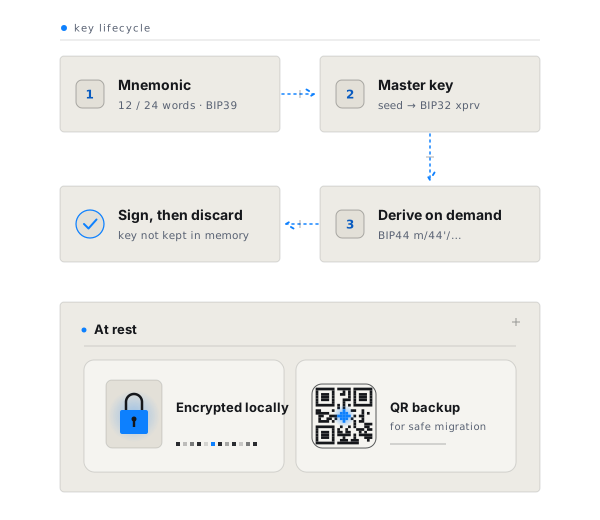
Encrypted locally
Mnemonic and seed material are stored with enhanced local encryption rather than uploaded for remote custody.
Standards compatible
BIP32, BIP39, and BIP44 compatibility helps keep wallet generation and recovery predictable.
Only derive when needed
Private keys are derived for transaction signing when required, reducing unnecessary exposure in normal use.
Encrypted backup options
QR-based mnemonic backup adds a practical layer for secure migration and disaster recovery.
Feature highlights
Encrypted locally
Standards compatible
Encrypted backup options
How it works
Secrets remain local, signing happens only when needed, and backup options support recovery without weakening control.
Mnemonic and seed material are stored with enhanced local encryption rather than uploaded for remote custody.
BIP32, BIP39, and BIP44 compatibility helps keep wallet generation and recovery predictable.
QR-based mnemonic backup adds a practical layer for secure migration and disaster recovery.
In the app
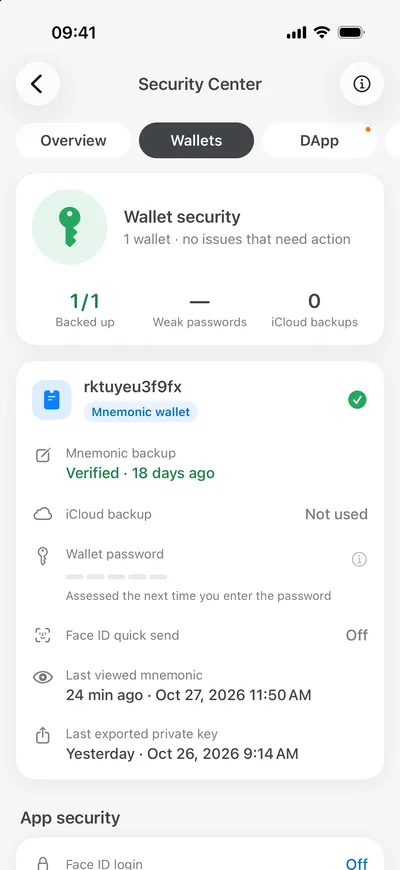
A security center that keeps watch.
Backups, passwords, DApp approvals and device alerts in one place. Ownbit warns you if a mnemonic is used on another device.
Download Ownbit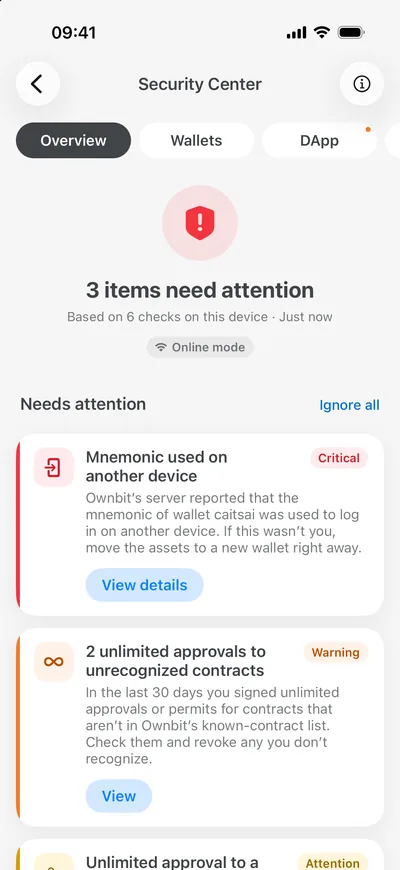
Download
Download Ownbit for the setup you need
Install the app, explore secure mode, set up MultiSig, or build a Cold Wallet flow for higher-value storage.